Issues, RFIs & clashes
The coordination loop: find a problem (a clash, an observation, a design question), record it against the model, route it to the right person, and close it with a second pair of eyes.
Related: Models & viewer · Field · Roles › Approval and segregation of duties · Troubleshooting
Issues
What it does
Full-lifecycle issue tracking where every issue is a node on the model graph: it links to elements, carries a viewpoint, has comments, a status workflow with a verification step, labels, ball-in-court routing, project-defined custom fields and templates, and BCF 2.x import/export for exchange with other tools.
Who uses it and why
Coordinators, reviewers, discipline leads, trades and site staff. It is the common currency between the viewer, clash detection, inspections, safety and the vendor integrations.
Prerequisites
A project. A model is optional but usual (issues without elements are plain records). To create: role Admin, Upload Engineer or Inspector (Inspectors raise photo-linked issues from Reality Capture).
Step-by-step
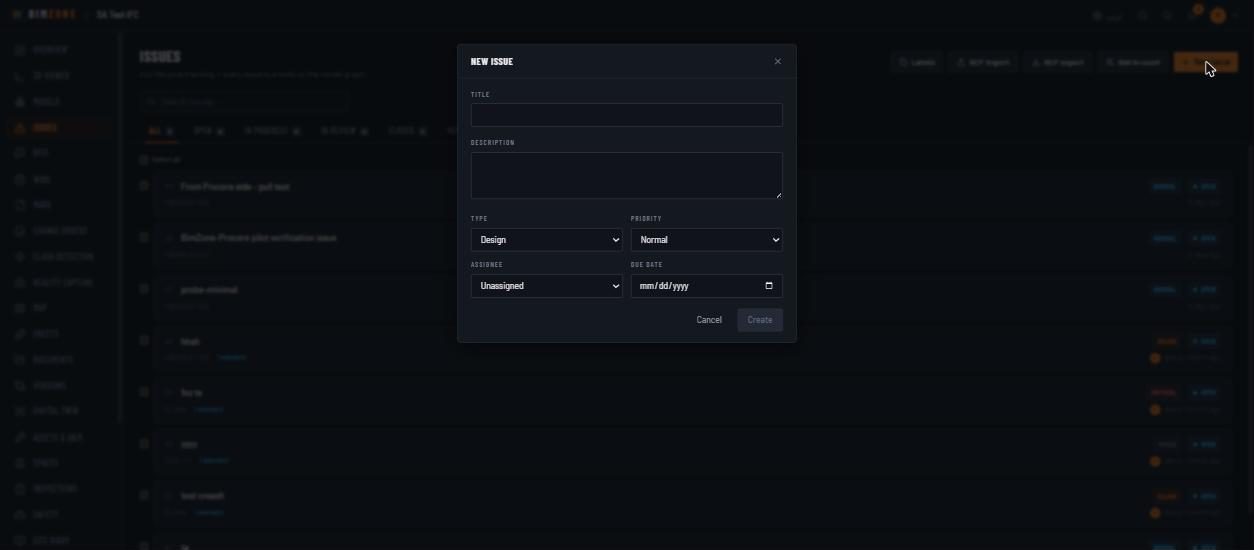
- Rail › Issues › New issue. Fill Title, Description, Type (design · clash · observation · quality · safety), Priority (critical · major · normal · minor), Assignee, Due date. If the project has Issue templates, a Template selector pre-fills these; if it has Custom fields, they appear here and required ones must be filled. Create.
- Or raise it from the viewer: select an element › Issue. The element and the camera viewpoint are attached automatically.
- Open the issue (click its row). In the drawer: change Status, Priority, Assignee, Due date; the Linked elements chips fly the viewer to the element; Comments with Send; Escalate to RFI when the answer needs a formal design response.
- Work it through Open → In Progress → In Review → Closed → Verified. Verification must be done by someone other than the issue's creator.
- Exchange with other tools: BCF export (the current filter) / BCF import (topics become issues; re-importing the same file updates rather than duplicates).
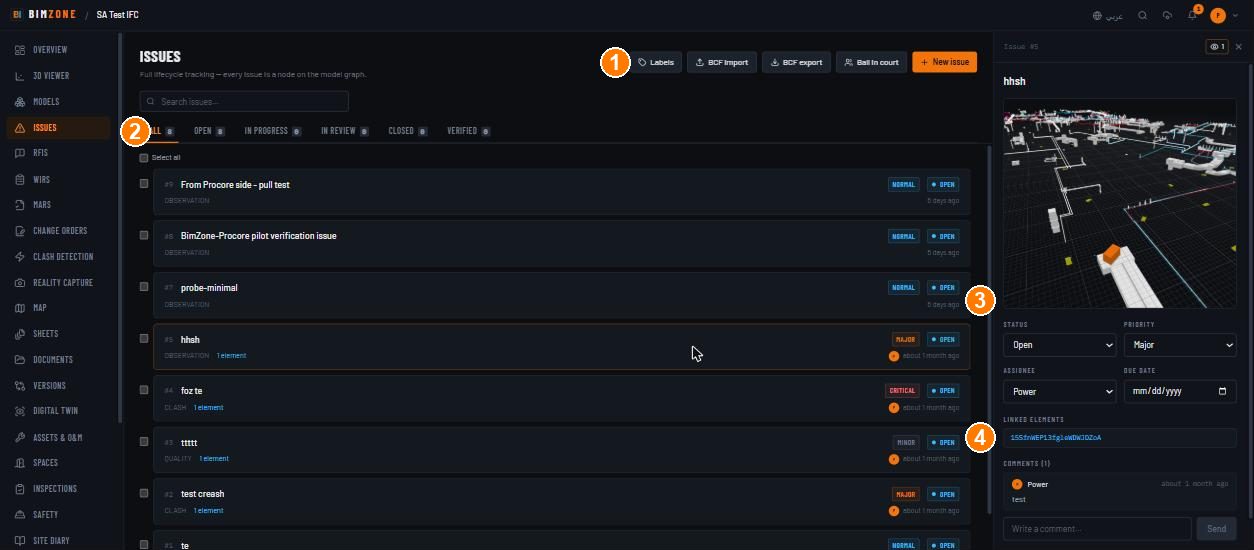
1 · Labels · BCF import · BCF export · Ball in court · New issue · 2 · status tabs with counts · 3 · issue drawer (status, priority, assignee, due date) · 4 · linked elements (click to fly)
Controls
- Header: Labels (manage the project's label set) · BCF import · BCF export · Ball in court (who each open issue is waiting on) · New issue.
- List: search "Search issues…" · tabs All / Open / In Progress / In Review / Closed /
Verified with counts · Select all and per-row checkboxes for bulk actions · rows show
#N, title, priority pill, status pill, type, "1 element", assignee, age. - Drawer:
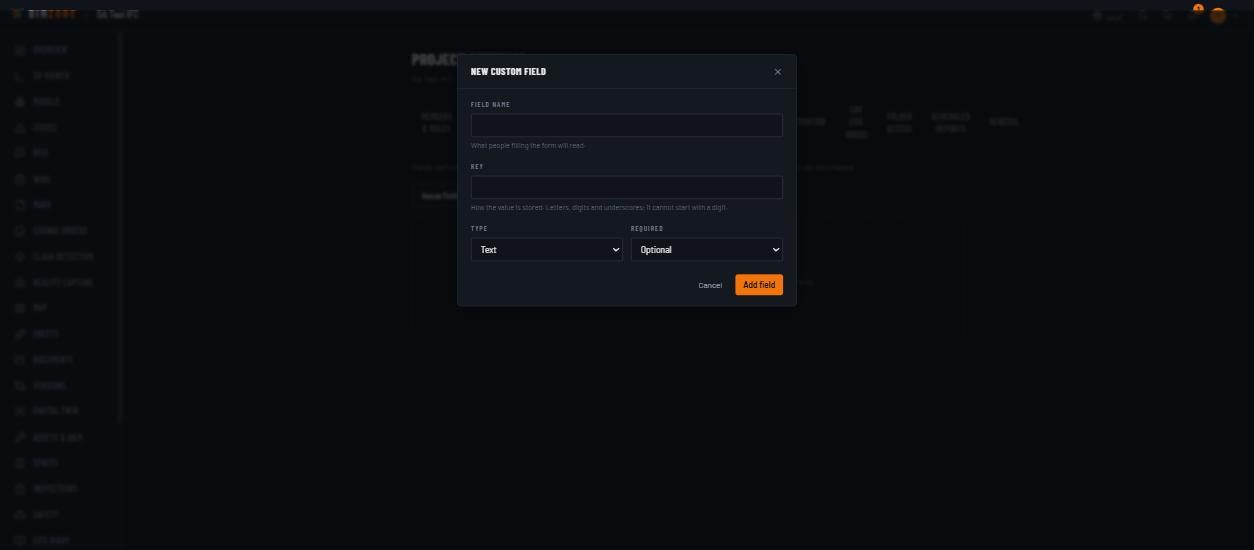
Issue #N· viewpoint thumbnail · Status (Open · In Progress · In Review · Closed — Verified appears when legal) · Priority · Assignee · Due date · Linked elements · custom-field section (when defined) · Comments (N) + "Write a comment…" Send · Escalate to RFI. - Settings › Custom fields (admin): "Fields defined here appear on every issue or RFI in this project. A required field must be filled before the record can be created." — Add field: Field name, Key ("Letters, digits and underscores; it cannot start with a digit."), Type (Text · Number · Date · Choice), Required.
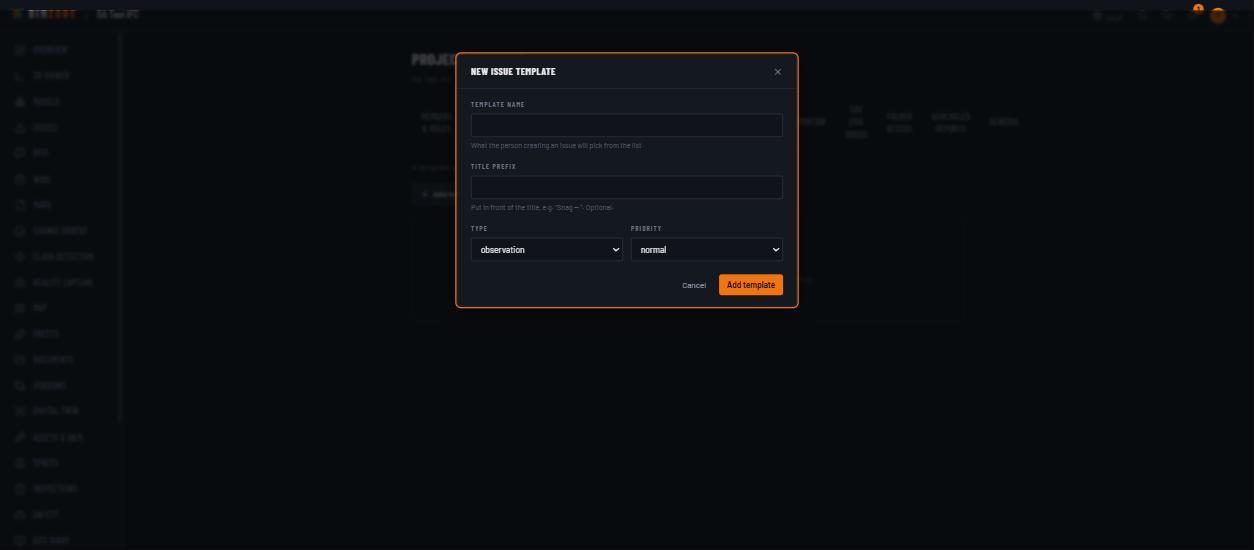
- Settings › Issue templates (admin): "A template pre-fills a new issue. Pick one in the New issue dialog and edit anything before creating." — Add template: Template name, Title prefix (e.g. "Snag — "), Type, Priority.
What happens after
Creating an issue notifies the assignee and posts to the project's Slack/Teams webhook if set;
issue.created also fires any automation rule on that trigger. Status changes are audited. A closed
issue can be reopened; a Verified issue is terminal — only an admin can reopen it, anyone else
raises a new issue. Issues linked to a Procore or ACC connection sync on the next push/pull.
Connections to other modules
Viewer (element + viewpoint), Clash Detection (a clash escalates into an issue), RFIs (Escalate to
RFI), Inspections (a failed checklist item auto-generates an issue; a failed compliance item becomes
critical), Safety (corrective tasks live on as issues), Automation (issue.created, issue.overdue),
Analytics (issue velocity, anomalies), Reports (punch list PDF), Integrations (ACC issues, Procore
observations), Copilot (reads and — with confirmation — creates issues).
Data in / data out
In: form fields, viewpoint, element links, comments, BCF files. Out: BCF export, Analytics ›
issues CSV / XLSX, the punch-list PDF from Inspections, the /api/feed/issues BI feed.
Permissions and approval
Create: Admin, Upload Engineer (Inspector via photo-linked flows). Edit/transition: any non-viewer member — an Inspector only on issues they created or are assigned; Verified requires a user other than the creator (maker-checker); admins may reopen a verified issue. Viewers read only ("Viewers cannot comment").
Common mistakes and troubleshooting
- "Update conflict" with "Latest on the server" — someone changed the issue while your drawer was open; re-apply your change on the fresh copy.
- "Saved offline — will sync when back online" — you are offline; the change is queued and replayed when the connection returns.
- Cannot set Verified — you created the issue; ask a second person.
- Required custom field missing — the toast names the field; fill it and create again.
- BCF import made duplicates — only when the BCF topics carry no GUIDs; exports from BimZone always do.
Limitations and integration prerequisites
- One assignee per issue (no watchers list); use comments to involve others.
- Procore sync pushes issues as observations; Procore's RFI tool must be enabled on the Procore project for RFIs to sync (see Integrations).
Where to go next
RFIs for formal questions; Clash detection for geometry conflicts.
RFIs
What it does
Auto-numbered Requests for Information with a formal response workflow, spec and drawing references, a responsible party and a required-by date; the answer must come from someone other than the raiser.
Who uses it and why
Contractors raise them, consultants and designers answer them, document controllers track the register.
Prerequisites
A project. Role Admin or Upload Engineer to raise; an Admin or Upload Engineer other than the raiser to answer or close. Once a Reviewer / Approver is routed, only that person can set Answered ("Only the routed approver (or reviewer, when no approver is set) may mark this RFI answered"); re-routing is for the raiser or an Admin.
Step-by-step
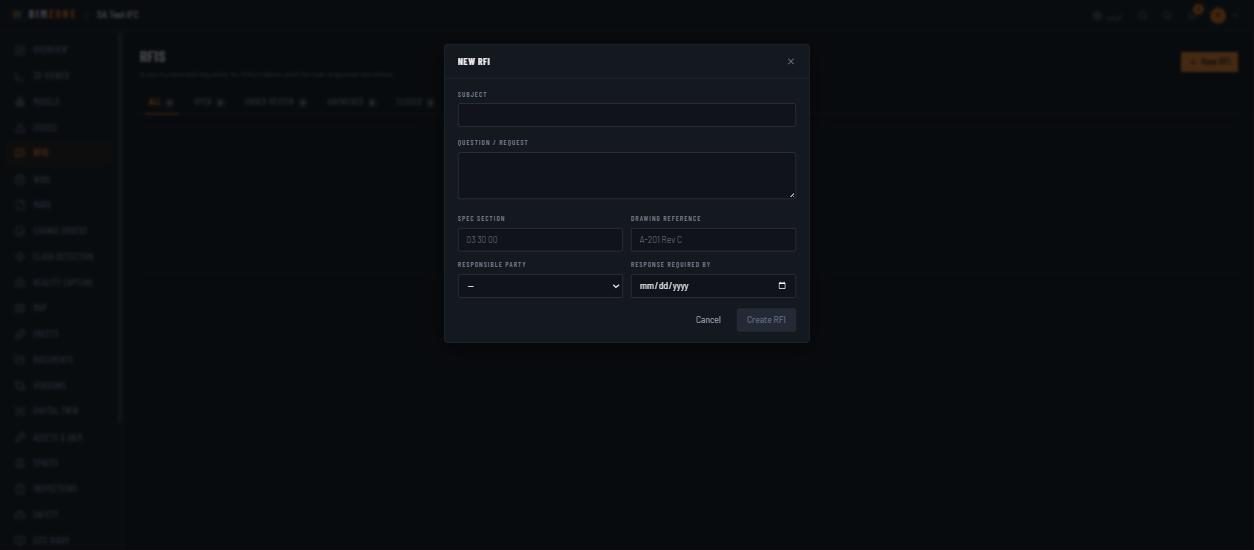
- Rail › RFIs › New RFI: Subject, Question / request, Spec section (e.g. 03 30 00), Drawing reference (e.g. A-201 Rev C), Responsible party (a project member), Response required by. Create RFI. Or start from an issue with Escalate to RFI to carry its model context.
- The responsible party opens it, moves it to Under review, writes the answer and sets Answered.
- Someone other than the raiser closes it (Closed is maker-checker, like Answered). An open RFI that no longer needs an answer can be moved straight to Closed — again by a second person.
Controls
Header New RFI · tabs All / Open / Under review / Answered / Closed · the RFI drawer with status, the answer and linked model context · custom fields (Settings › Custom fields › RFI fields).
What happens after
The responsible party is notified; rfi.overdue fires automation rules after the required-by date;
ACC-connected projects sync RFIs on push/pull.
Connections to other modules
Issues (escalation source), Change Orders (an answer with cost/time impact leads to a change order), Analytics (RFIs awaiting answer, RFI response time), Site Diary ("RFIs opened / answered" for the day), Integrations (ACC RFIs).
Data in / data out
In: the form, attachments. Out: Analytics › rfis CSV / XLSX, /api/feed/rfis.
Permissions and approval
Workflow: open → under_review → answered → closed (open may be closed directly = withdrawn).
Answered and Closed must be set by someone other than the submitter.
Common mistakes and troubleshooting
- Cannot answer your own RFI — by design; the responsible party answers.
- RFI does not appear in Procore — Procore's RFI tool is not enabled on that Procore project;
the sync ledger shows
Procore create RFI failed (404).
Limitations and integration prerequisites
No RFI templates; use custom fields for recurring metadata.
Where to go next
Clash detection · Change orders.
Clash detection
What it does
A geometric clash engine over the federated models — hard, clearance and duplicate detection — with a triage worklist scored by severity, discipline ownership rules, suppression of accepted pairs, aging/SLA, re-break risk, hot zones, forecasts, a change digest, coordination meetings, KPIs and a governance ledger of every decision.
Who uses it and why
BIM coordinators and discipline leads. It turns thousands of raw intersections into a prioritised list with an owner, and records who decided what.
Prerequisites
At least one READY model (two disciplines or two models for cross-model tests). Role Admin to create and run tests, edit ownership settings and triage (status, owner); any member to read.
Step-by-step
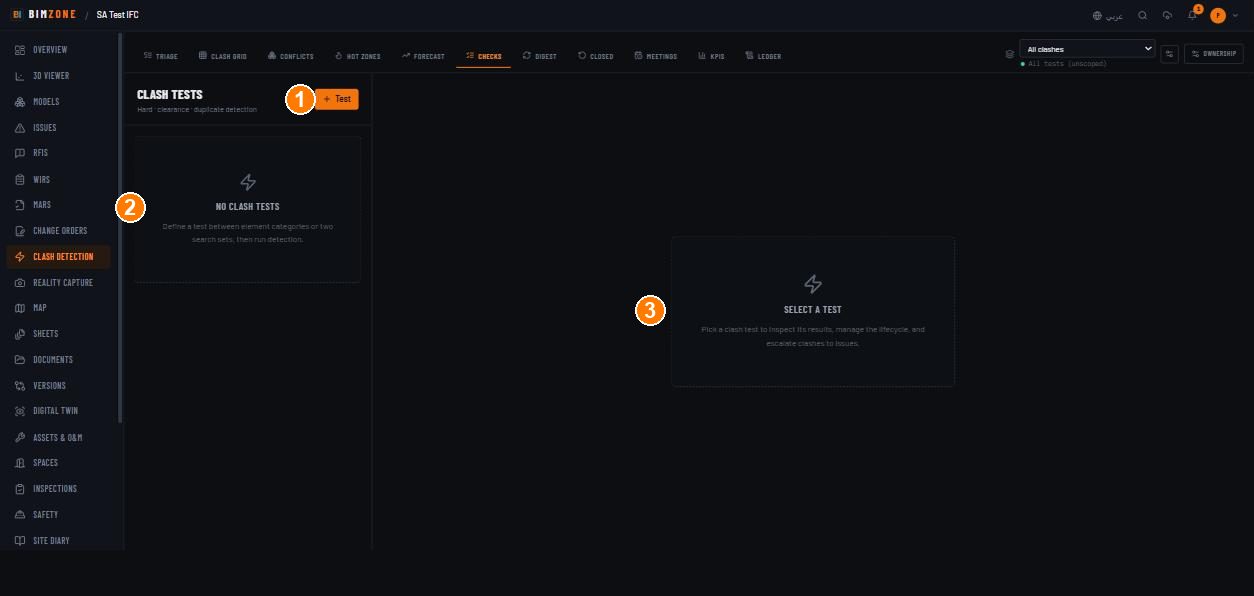
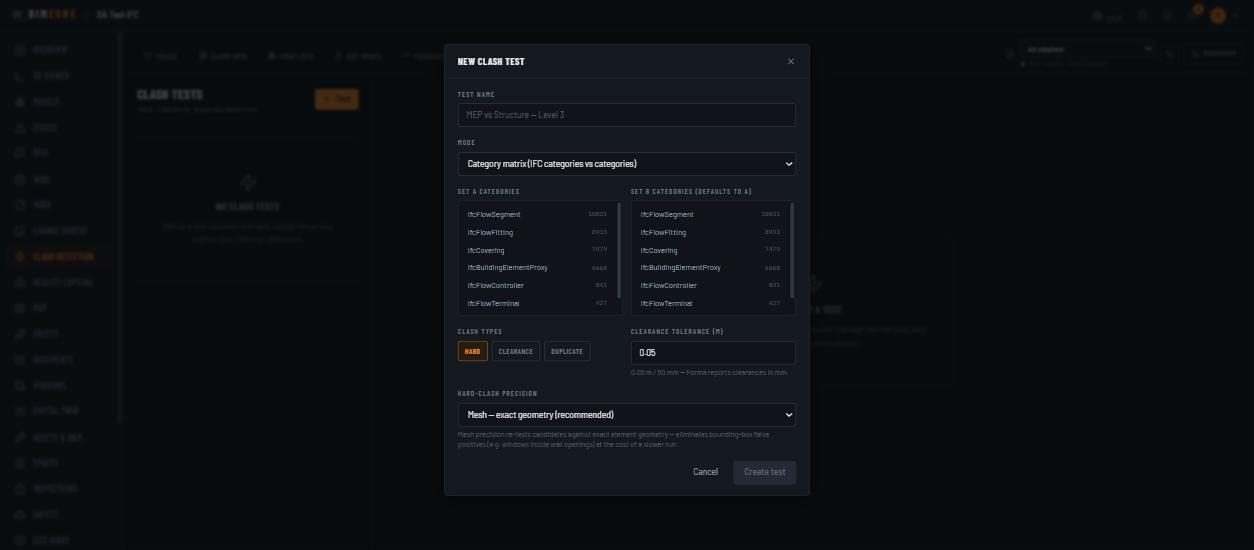
- Rail › Clash Detection › Checks tab › + Test. In New clash test: Test name (e.g. "MEP vs Structure — Level 3"); Mode = Category matrix (IFC categories vs categories) or Search set vs search set; tick Set A categories and Set B categories (defaults to A); Clash types HARD / CLEARANCE / DUPLICATE; Clearance tolerance (m) (0.05 m = 50 mm); Hard-clash precision Mesh — exact geometry (recommended) or Bounding box — fastest. Create test.
- Select the test in the Clash tests list and Run it. The run is a background job (watch Cloud activity); results populate the test and the Triage worklist.
- Triage tab: filter by severity, discipline, owner, status; sort by Severity, Reactivation risk or Delay risk; toggle Overdue, Chronic, Trade interfaces. Open a clash to see both elements, the overlap, and to change status, owner or comment.
- Review in 3D: viewer › right edge › Verify — review clashes in 3D; pick the clash; the model ghosts and the two elements are painted.
- Decide: assign an owner, set Reviewed / Approved / Resolved / Not An Issue / Acceptable / Duplicate, or escalate to an Issue. Decisions are recorded in the Ledger.
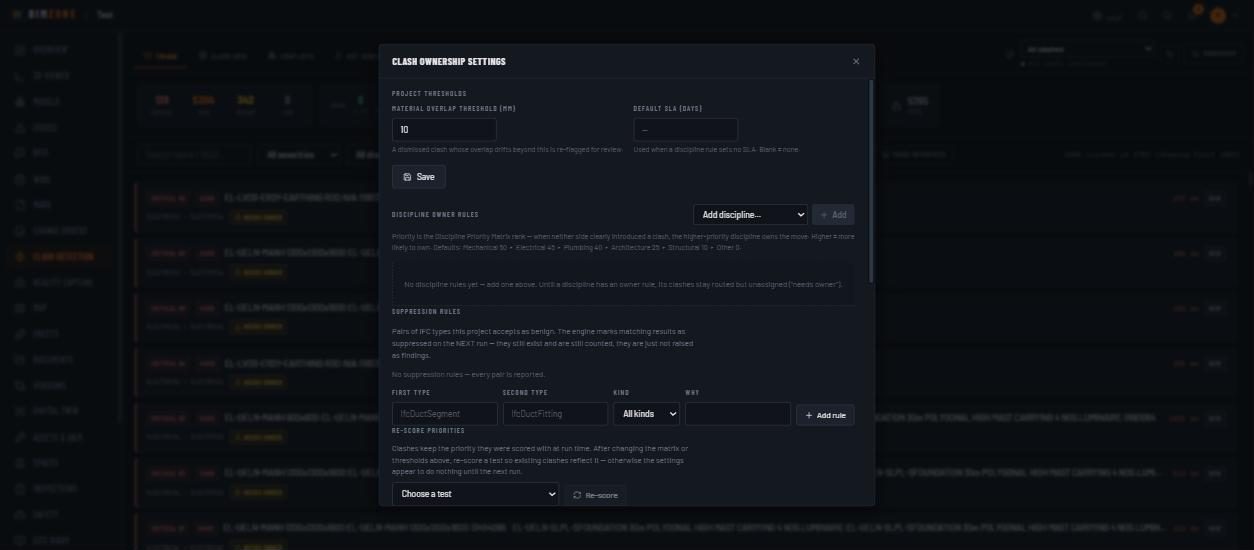
- Tune the project: OWNERSHIP › discipline owner rules, suppression rules, thresholds; then Re-score the test so existing clashes reflect the new matrix.
- Run a coordination meeting (admins schedule; anyone attends): Meetings tab › New session › Title, Scheduled for, Location, Facilitator (— Select chair —), Attendees (click member chips) › Schedule session. On the session: Generate agenda ("Generate the agenda from triage signals, or add specific clashes manually." — Test, Min severity, Limit) or Add clash (search open clashes by name / GUID); Manage attendees; Start session steps through the agenda in Run mode — per item Open in viewer and record Accepted · Mark for fix · Deferred · Reassigned (or skip; re-decide by choosing another outcome). Enter Minutes and Complete session: the agenda locks and Export PDF / Export BCF appear on the minutes. Accepting, deferring or dismissing a clash in the meeting is a governance decision — the clash's owner or reviewer cannot record it for their own clash.
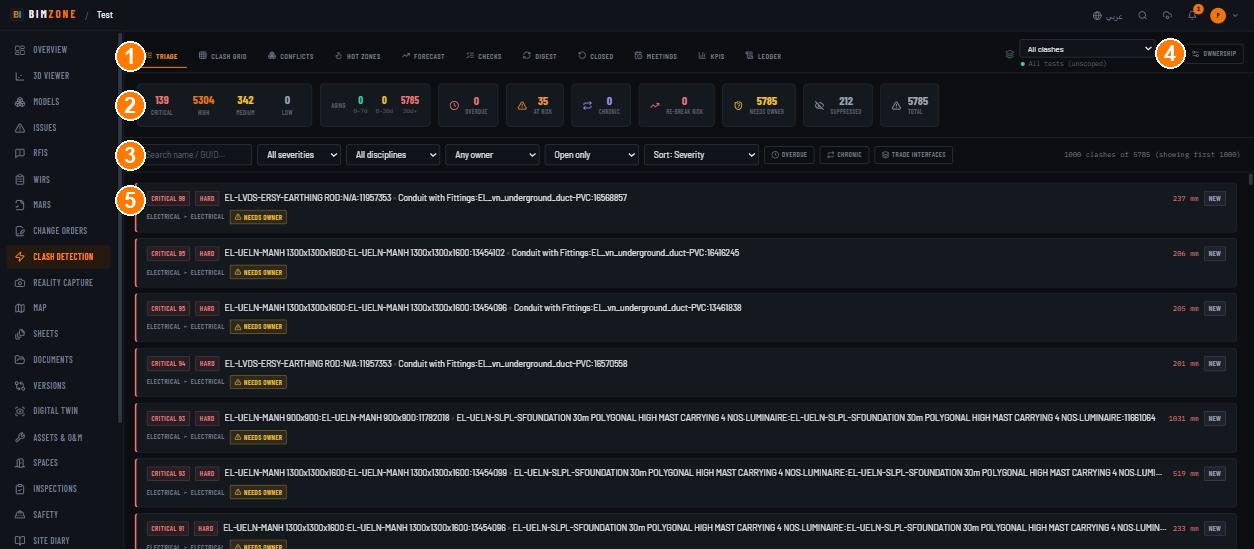
1 · tabs (Triage · Clash grid · Conflicts · Hot zones · Forecast · Checks · Digest · Closed · Meetings · KPIs · Ledger) · 2 · KPI tiles · 3 · filters and sorts · 4 · OWNERSHIP settings · 5 · a clash row (severity score, HARD, element × element, overlap mm, status, discipline pair, owner)
Controls
- Tabs: Triage (worklist) · Clash grid (model-pair matrix; pick a cell to open that test) · Conflicts (clusters) · Hot zones (level × grid-zone × discipline pair density) · Forecast · Checks (the test list, + Test, Run, results, BCF export) · Digest (what changed since the last run) · Closed · Meetings (coordination sessions with facilitator, reviewers and attendees) · KPIs · Ledger (governance decisions).
- Scope: All clashes select (one test or all) and Manage coordination sets (saved scopes).
- KPI tiles: CRITICAL · HIGH · MEDIUM · LOW · AGING (0–7d · 8–30d · 30d+) · OVERDUE · AT RISK (trending toward an SLA breach) · CHRONIC · RE-BREAK RISK · NEEDS OWNER · SUPPRESSED (toggle to reveal auto-suppressed noise: duplicates / self-overlaps / nesting) · TOTAL.
- Filters: "Search name / GUID…" · All severities · All disciplines (Mechanical · Electrical · Plumbing · Architecture · Structural · Other) · Any owner / Assigned to me / Needs owner · Open only / All statuses (New · Active · Reviewed · Approved · Resolved · Not An Issue · Acceptable · Duplicate) · Sort · OVERDUE · CHRONIC · TRADE INTERFACES ("Rank the worst-offending discipline interfaces"). Large lists are capped: "1000 clashes of 5785 (showing first 1000)".
- OWNERSHIP (Clash ownership settings):
- Project thresholds — Material overlap threshold (mm) ("A dismissed clash whose overlap drifts beyond this is re-flagged for review.") · Default SLA (days) ("Used when a discipline rule sets no SLA. Blank = none.") · Save.
- Discipline owner rules — Add discipline… › Add; priority is the Discipline Priority Matrix rank ("Defaults: Mechanical 50 ▸ Electrical 45 ▸ Plumbing 40 ▸ Architecture 25 ▸ Structural 10 ▸ Other 0"). "Until a discipline has an owner rule, its clashes stay routed but unassigned ('needs owner')."
- Suppression rules — First type, Second type, Kind (All kinds…), Why › Add rule. "The engine marks matching results as suppressed on the NEXT run — they still exist and are still counted, they are just not raised as findings."
- Re-score priorities — Choose a test › Re-score. "Clashes keep the priority they were scored with at run time. After changing the matrix or thresholds above, re-score a test so existing clashes reflect it — otherwise the settings appear to do nothing until the next run."
- Re-break risk list and the latest runs with their cap state ("The last run hit the detection cap — some clashes were not stored").
- Checks › per test: Run · results list · BCF export (honours the clash-type and open/all filters; deterministic topic GUIDs, so re-exporting an unchanged register does not duplicate topics).
- Viewer clash panel: "Filter by name, GUID, group…"; a colour legend while a clash is shown; seek/clear pill.
What happens after
A run stores results (subject to the detection cap), scores each clash, applies suppression rules,
routes to discipline owners, and emits clash.created for automation. Decisions write to the Ledger.
Escalated clashes become issues that carry both elements.
Connections to other modules
Models (inputs), Viewer (Verify mode), Issues (escalation), Search sets (test scope), Automation
(clash.created), Analytics (clash trend, trade interfaces, hot zones), Versions (new clashes in the
comparison window), Site Diary (clashes detected per day), Integrations (Procore coordination issues).
Data in / data out
In: model geometry, ownership rules, decisions. Out: BCF export per test, Analytics › clashes
CSV / XLSX, /api/feed/clashes.
Permissions and approval
Create/run tests, ownership settings, re-score, triage (status, owner), coordination sessions: Admin. Everyone else reads. Closing decisions (Approved, Resolved and the other terminal states) cannot be made by the clash's own owner or reviewer — a second person decides; the same rule applies to decisions taken in a coordination meeting. Bulk status changes are limited per group.
Common mistakes and troubleshooting
- Triage is empty — no test has been run: Checks › + Test › Run.
- "Upload and convert at least one model first." — no READY model.
- Everything is NEEDS OWNER — add discipline owner rules in OWNERSHIP.
- Changed the matrix, nothing happened — press Re-score for the test.
- Suppression rule has no effect — it applies on the NEXT run; run the test again.
- Counts look low — the run hit the detection cap; every derived count is a floor. Narrow the test (search sets, fewer categories) and re-run.
- A "resolved" clash came back — the overlap drifted beyond the material overlap threshold; it is re-flagged on purpose.
Limitations and integration prerequisites
- Result sets are capped per run; the settings modal lists which tests are capped.
- Point clouds are not clash-tested.
- Clearance tolerance is entered in metres (the UI reminds you Forma reports mm).
- Importing a Navisworks Clash Detective XML or a Solibri BCF 2.1 zip into the ledger is API-only
(
POST /api/projects/:projectId/clashes/import, admin) — no button in the UI yet.
Where to go next
CDE, documents & sheets · Automation to file
issues on clash.created automatically.