Copilot
Ask questions about one project in plain language and get answers grounded in the project's own data; let it make a change only after you confirm exactly what it is about to do.
Related: Issues, RFIs & clashes · operator runbook Copilot credentials · Glossary
Copilot
What it does
A project assistant that answers from the same tools the API exposes — projects, elements, issues, RFIs, WIRs, MARs, clash figures, project statistics — and cites the tool calls it used. (The input placeholder mentions the programme; there is no schedule tool yet, so it will say it cannot see it.) If the answer requires a write (creating an issue, for example) it stops and asks for your confirmation, then performs exactly that one action. "Answers are grounded in the same data the API returns — nothing is estimated."
Who uses it and why
Anyone on the project: a manager asking "how many critical issues are open?", a coordinator asking "summarise the clashes on Basement 01", a site engineer creating an issue by describing it. It runs with your permissions: "it can never see or touch anything you could not."
Prerequisites
- An operator must have configured at least one model provider on the server (see the Copilot credentials runbook). Until then the page loads and the request returns the message "No copilot model is configured…" — the feature is off, not broken.
- Any project role to ask. Write tools are only offered to roles that could make the change by hand; a Viewer sees no write tools at all.
Step-by-step
- Rail › Copilot. Admins can press Check model status: each configured provider is pinged
and listed as Primary / Fallback,
vendor:model, andok · N msor the vendor's own error. - Type in Ask about issues, clashes, RFIs, the programme… and press Ask (or Enter). Try "how many clashes are still open?" or "summarise the critical issues".
- Read the answer. The footer names the model that produced it (
google:gemini-2.5-flash), the number of tool calls, and sources you can expand to see the exact records it was shown. - Ask for a change ("create a major issue titled 'Missing fire stopping at L3 riser'"). The
copilot replies with a confirmation card titled This would change the project, showing the
tool and the exact arguments — not editable — and a Confirm and run button. Nothing is written
until you press it ("Confirmed and run." follows). After confirmation the
record exists like any other and the action is audited as
copilot.write_confirmed. - Keep the conversation going; follow-ups keep the context of the same conversation.
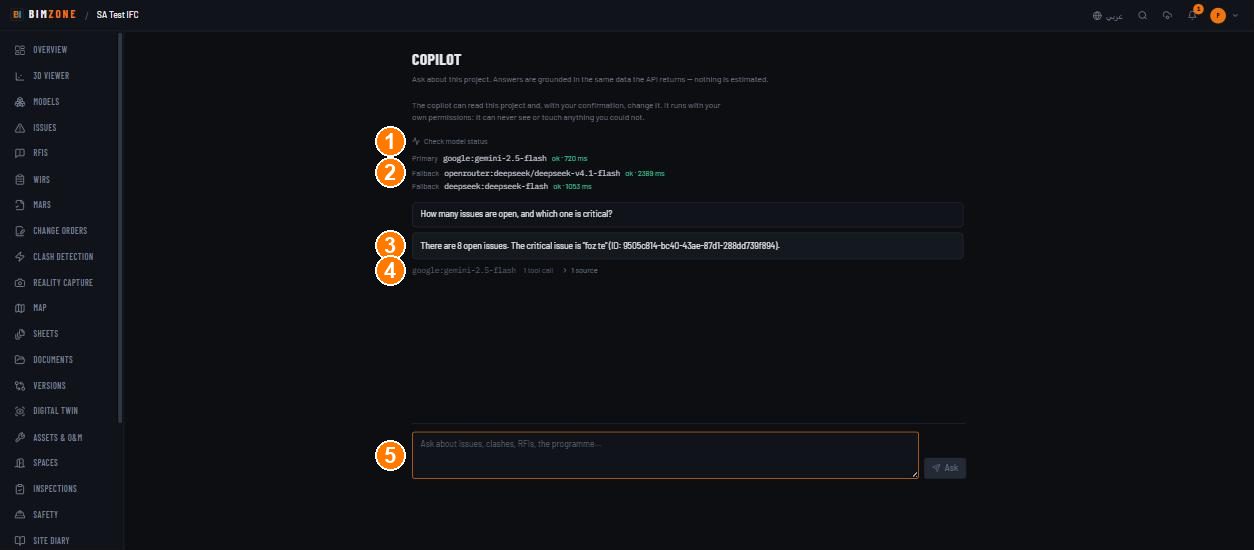
1 · Check model status (admins) · 2 · provider rows (Primary / Fallback, model, latency or error) · 3 · the answer · 4 · footer: model · tool calls · sources · 5 · the question box
Controls
Check model status · question box · Ask · answer cards with expandable sources · confirmation card (This would change the project → Confirm and run; to decline, simply ask something else).
What happens after
- Reads change nothing. A confirmed write performs exactly one action with the arguments shown; the confirmation token is bound to your user, the project, the conversation, the tool and those arguments, so it cannot be replayed for anything else or by anyone else.
- Every confirmed write appears in the project Activity feed as Copilot Write Confirmed and in the workspace audit log.
- Rate limit: 30 requests per minute per session; a burst beyond that returns 429 — wait a minute.
Connections to other modules
Reads elements, issues, RFIs, WIRs, MARs, clash figures and project statistics through the same tools the API uses (no schedule or progress tool today); writes (after confirmation) land in Issues and the other registers exactly as a manual change would, so integrations and automation react to them normally.
Data in / data out
In: your question and confirmations; the tool results the model is shown (scoped to the project you are in). Out: nothing leaves the deployment except the prompt and tool results sent to the configured model vendor.
Permissions and approval
Ask: any project role. Write tools: offered only where your role could perform the write; the confirmation step is mandatory for every write — there is no "auto-approve". Admins only: Check model status.
Common mistakes and troubleshooting
- 503 "No copilot model is configured. Set a provider key — GOOGLE_API_KEY, OPENROUTER_API_KEY or DEEPSEEK_API_KEY — or COPILOT_API_KEY with COPILOT_PROVIDER…" — an operator has not configured a provider; the feature is off.
- 503 with a vendor error after a long wait — every configured vendor failed (rate limit, 5xx, timeout). Try again; if it persists, the operator checks Check model status.
- "It said it does not have that information" — the tools do not contain it (e.g. a question about another project, or a figure the API does not compute). Rephrase within the project's data.
- The answer stopped after several tool calls — the loop is bounded; ask a narrower question.
- It refuses to create something — your role cannot; the copilot never exceeds your permissions.
- 429 — 30 questions a minute per session; wait.
Limitations and integration prerequisites
- Scoped to one project at a time; it cannot answer across the portfolio.
- Quality follows the tools: it reports what the API returns, never estimates.
- Needs a vendor credential on the server (Google, OpenRouter, DeepSeek, Anthropic, or any OpenAI-compatible endpoint) and outbound internet from the API container to that vendor.
- Failover between vendors happens only on vendor failure, never on a refusal.